
We detect you are using an unsupported browser. For the best experience, please visit the site using Chrome, Firefox, Safari, or Edge. X
Maximize Your Experience: Reap the Personalized Advantages by Completing Your Profile to Its Fullest. Update Here
Stay in the loop with the latest from Microchip. Update your profile while you are at it. Update Here
Complete your profile to access more resources. Update Here

MPLAB® Data Visualizer

Live Chat

Need Help?

Privacy Policy

Overview

Troubleshooting your code's run-time behavior has never been easier. MPLAB® Data Visualizer is a free debugging tool that graphically displays run-time variables in an embedded application. Available with MPLAB Tools for VS Code®,as a plug-in for MPLAB X Integrated Development Environment (IDE), or as a stand-alone debugging tool, it can receive data from various sources such as the Embedded Debugger Data Gateway Interface (DGI) and COM ports. You can also track your application's run-time behavior using a terminal or graph. To get started with visualizing data, check out the Curiosity Nano Development Platform and Xplained Pro Evaluation Kits.
MPLAB Tools for VS Code®

Did you know MPLAB Data Visualizer and more MPLAB Tools are now available in Microsoft® Visual Studio Code (VS Code)? You can now use your favorite MPLAB Tools in the world’s most popular code editor. Visit our MPLAB Tools for VS Code page to learn more.

Key Features
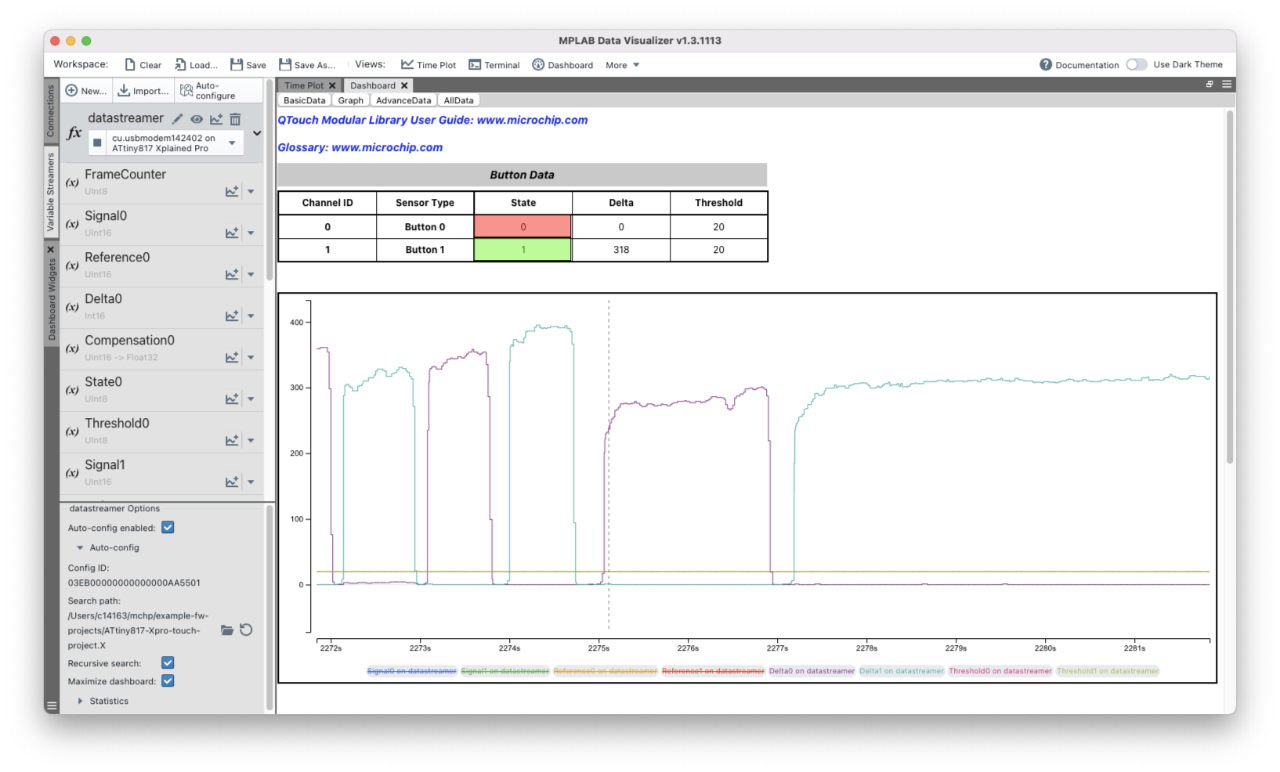

  • Capture data streamed from a running embedded target via serial port (CDC) or the Data Gateway Interface (DGI)
  • Capture power data generated by the Power Monitor embedded on the Curiosity Nano Explorer
  • Concurrently stream data and debug target code using the MPLAB X IDE
  • Decode data fields at runtime using the Data Stream (DS) Protocol format
  • Automatically load Data Stream and Dashboard configuration for the DS data stream
  • Stream and modify global variables using the run-time configurable Data Visualizer Run Time (DVRT) protocol
  • Visualize the raw or decoded data in a Graph as a time series or display the data in a terminal
  • Configure the Graph as a rolling time plot or as a simple oscilloscope with egde triggers
  • Analyze plotted data using cursors to measure bandwidth, pulse width and more
  • Log data to file as it is being captured, using CSV or compressed Apache Arrow format.
  • Save a snapshot of plotted data as CSV or JSON
  • Visualize and analyze power consumption on supported platforms
  • Visualize sampled PC values while debugging on supported platforms
  • Monitor data for or input data to an application using a custom dashboard

*For information on specific DGI features, check the user guide for your board or in MPLAB Data Visualizer when your kit is connected.

Did you know that MPLAB Data Visualizer is now supported in Microsoft® Visual Studio® Code (VS Code®) via our MPLAB Extensions for VS Code? These extensions are currently released under an early access program to allow users to provide us with feedback for additional development. Join the conversation and help us to refine and expand our offerings.

MPLAB Data Visualizer Version 1.6.2606 Released


Version 1.6.2606 of MPLAB Data Visualizer includes several enhancements, including:

  • Added support for the X2Cscope protocol, with streaming and watch functions for X2Cscope-enabled targets
  • Improved dashboard with new widgets for reading and writing variables for supported protocols
  • Enhanced usability with new drag-and-drop interactions for plots, axes and terminal views
  • Improved default panel layouts, theming and symbol selection to streamline workflows and improve accessibility
  • Resolved reported issues

For more information, please refer to the release notes.

Downloads and Documentation


Title  Download
MPLAB Data Visualizer v1.6.2606 (Windows® OS)Download
MPLAB Data Visualizer v1.6.2606 (macOS® OS)Download
MPLAB Data Visualizer v1.6.2606 (Linux® OS)Download
MPLAB Data Visualizer v1.6.2606 Release NotesDownload
MPLAB Data Visualizer User's GuideDownload
DVRT Example Project for PIC16F18446Download

Need Some Help?


We are here to support you. Contact our Client Success Team to get assistance with your design.



Microchip University

Using the MPLAB® Data Visualizer

In this video, learn about:

  • Plotting debug GPIO
  • Kit detection
  • Plot all pins: add new plot, assign source
  • Using cursors to measure a time between two cursors

Live Chat

Need Help?

Privacy Policy