
Comparing LCC, Parallel 8080 and SPI Displays for PIC32-BZ6 Multiprotocol, Wireless MCUs
Adding a display doesn’t have to mean added complexity. Explore how the PIC32‑BZ6 wireless MCU enables flexible UI designs using LCC, Parallel 8080 and SPI displays and discover which interface best fits your cost, performance and power goals.

Introduction
As connected devices grow more interactive, engineers are increasingly tasked with adding local displays without blowing up Bill of Materials (BOM) or system complexity. The PIC32-BZ6 wireless microcontroller (MCU) streamlines this challenge by supporting multiple display interfaces alongside Bluetooth® and 802.15.4 (Thread® and Matter) connectivity. This makes it suitable for IoT applications that combine wireless communication with responsive graphical user interfaces.
This article compares three supported display interfaces (LCC, parallel 8080 and SPI), highlighting their trade-offs, ideal use cases and available demos for hands-on evaluation.
Overview of Display Interfaces on PIC32-BZ6
Interface | Color Depth | Max Resolution | Frame Buffer Location | Pin Count | Use Case |
|---|---|---|---|---|---|
LCC | 8-bit RGB332 | 480 × 272 | Internal | High | Cost-sensitive UIs with moderate graphics |
Parallel 8080 | 16-bit RGB565 | 320 × 480 | External | Medium | Higher color depth and resolution |
SPI | 16-bit RGB565 | 240 × 240 | External | Low | Small, low-power displays |
Low-Cost Controllerless Interface (LCC)
How It Works
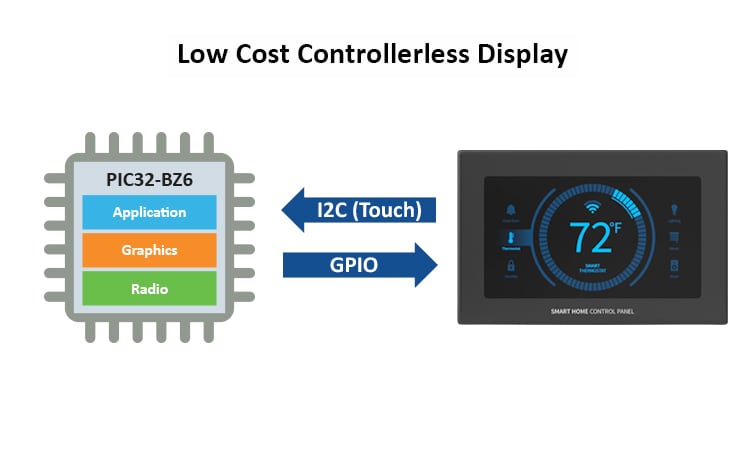
LCC leverages the MCU’s Direct Memory Access (DMA), timers and General-Purpose Input/Outputs (GPIOs) to drive pixel data directly from internal memory to the display; no external controller is required. This setup supports 8-bit RGB332 color and resolutions up to 480 × 272 pixels.
Key Features
This solution provides the following display and system capabilities:
- Color depth: 8-bit RGB332
- Max resolution: 480 × 272 (e.g., 4.3-inch TFT)
- Frame buffer: Internal to MCU
- Interface: GPIO (no controller needed)
- Wireless stack coexistence: Bluetooth LE and 802.15.4 stacks run concurrently with graphics
Advantages
These advantages help reduce system cost and simplify display implementation:
- Eliminates external LCD controllers, reducing cost and complexity
- Uses on-chip resources to simplify design
- Suitable for medium-sized displays with basic GUI elements
Limitations
The following considerations may affect suitability for certain designs:
- Limited color depth compared to RGB565
- Consumes internal RAM and DMA resources
- Higher GPIO usage (for RGB and sync signals)
Recommended Applications
This solution is well suited for the following application types:
- Smart thermostats and climate panels
- Entry-level Human-Machine Interfaces (HMIs) in industrial control
- Consumer appliances with simple touch UIs
When to Use
Choose LCC for cost-effective, controllerless display designs that can dedicate internal resources to UI rendering. Consider other options if memory is limited or higher color fidelity is required.
LCC Demo
Evaluate LCC in action with our 4.3-inch LCD demo running graphics, touch input and Bluetooth LE communication. Learn more about the LCC demo.
Parallel 8080 Interface
How It Works
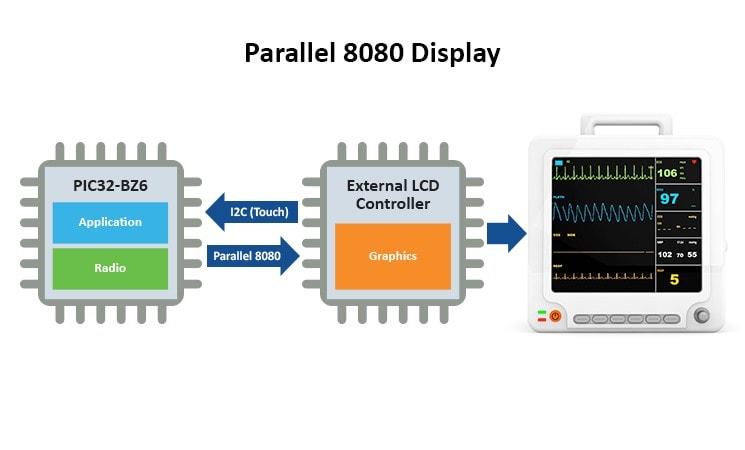
The parallel 8080 interface connects PIC32-BZ6 to an external LCD controller (e.g., ILI9488), which handles the frame buffer and display timing. It supports 16-bit RGB565 color and higher resolutions than LCC up to 320 × 480 pixels.
Key Features
This solution offers the following display and system capabilities:
- Color depth: 16-bit RGB565
- Max resolution: 320 × 480 (e.g., 3.5-inch TFT)
- Frame buffer: External (on LCD controller)
- Interface: Parallel GPIOs using the 8080 protocol
- Wireless stack coexistence: Bluetooth LE and 802.15.4 supported concurrently
Advantages
These features enable enhanced visual quality and system performance:
- Richer color depth and resolution compared to low-cost LCC designs
- Display management offloaded to an external controller
- Reduced MCU RAM and processing overhead
Limitations
The following considerations may affect design suitability:
- Potentially higher system cost due to the external controller
- Moderate GPIO usage for parallel data and control signals
Recommended Applications
This solution is well suited for the following application types:
- Industrial handheld devices and diagnostics tools
- Portable medical devices with color UIs
- High-end HVAC systems and smart building control panels
When to Use
Use this approach when higher color depth and resolution are required and display tasks should be offloaded from the MCU. Consider alternative solutions for ultra-low-cost designs or applications with minimal display requirements.
Parallel 8080 Demo
Explore our 3.5-inch demo showcasing high-resolution graphics, Bluetooth connectivity and touch input. Learn more about the parallel 8080 demo.
Serial Peripheral Interface (SPI)
How It Works
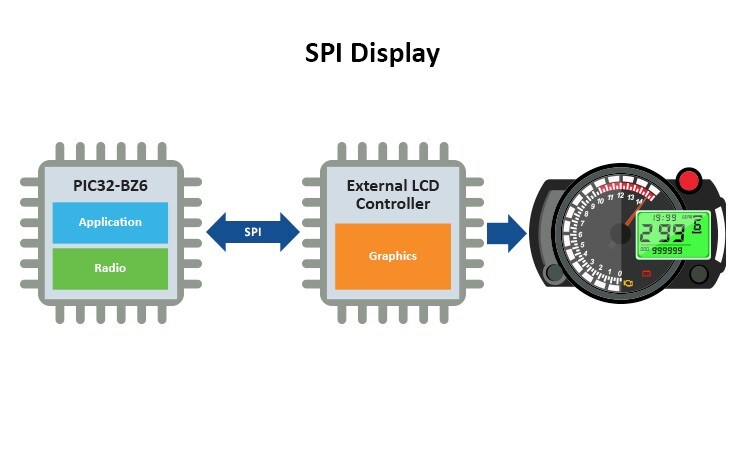
SPI uses a four-wire serial bus to send pixel data from the MCU to an external display controller. It is best suited to compact displays (e.g., 240 × 240 or smaller), where limited bandwidth and slower refresh rates are acceptable.
Key Features
This interface provides the following display and system capabilities:
- Color depth: 16-bit RGB565
- Max resolution: 240 × 240 (e.g., 1.28-inch round TFT)
- Frame buffer: External (on LCD module)
- Interface: Four-wire SPI
- Wireless stack coexistence: Bluetooth LE/802.15.4 runs in parallel
Advantages
These characteristics support simple, low-power display designs:
- Minimal pin usage
- Lower system power consumption
- Well-suited for round or small square screens
Limitations
The following factors should be considered during system design:
- Slower update rates for large displays
- Not ideal for complex animations or full-screen refresh
Recommended Applications
This interface is well suited for the following application types:
- Compact industrial controllers
- Small user interfaces on battery-powered handheld devices
When to Use
Choose SPI when a small, low-power display is required and minimal GPIO usage is a priority. Consider other display interfaces for full-screen GUIs or graphics-intensive applications.
Conclusion
PIC32-BZ6 devices provide engineers with a flexible set of display interface options:
- Use LCC designs for entry-level GUIs and simplified hardware
- Use parallel 8080 when higher color-depth is required and display tasks should be offloaded from the MCU
- Use SPI for compact, power-efficient displays where pin count and simplicity are critical
All three interfaces operate alongside the device’s wireless stack—enabling connected, interactive devices without the need for a second MCU.
Try It for Yourself
Explore available demos, reference designs and ordering options for the PIC32-BZ6 Curiosity Development Board, an efficient way to prototype display and wireless functionality.