Log in to myMicrochip to access tools and benefits. Sign up in just one minute.
Maximize Your Experience: Reap the Personalized Advantages by Completing Your Profile to Its Fullest. Update Here
Stay in the loop with the latest from Microchip. Update your profile while you are at it. Update Here
Complete your profile to access more resources. Update Here

Overview
Devices Supported: MCP2515, MCP2561
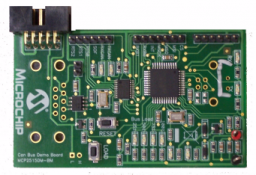
The MCP2515 CAN Bus Monitor Demo Board kit contains two identical boards which can be connected together to create a simple two node Controller Area Network (CAN) bus, which can be controlled and/or monitored via the included PC interface. The board(s) can also be connected to an existing CAN bus.
Using the PC interface, users can configure the MCP2515 registers, send CAN messages, and receive CAN messages. CAN traffic can be generated using a button on the board not connected to the PC.
There are also several headers (test points) so the MCP2515 pins can be monitored.
- Two identical boards and a CAN cable for creating a small CAN bus
- USB interface and PC software to interface to the CAN bus
- CAN bus PC software
- Button for changing the bus load on the Traffic Generator node
- Headers (test points) for monitoring the MCP2515 pins (CAN, SPI, and status/interrupt pins)
- PIC18F4550 PIC® Microcontroller (MCU) with ICD2 interface/header for in-circuit programming.
N/A
Cannot load image!
Documentation
Filter by Document Type
Search Documentation
|
Title
|
Document Category
|
|||
|---|---|---|---|---|
| MCP2515 CAN Bus Monitor Demo Board User's Guide | User Guide | Download | ||
| MCP2515 CAN Bus Monitor Demo Board Firmware | Software Libraries and Firmware | Download | ||
| MCP2515DM-BM PC Software Rev 2.0 | Software Libraries and Firmware | Download | ||
| MCP2515 CAN Bus Monitor Demo Board Gerbers | Board Design Files | Download | ||
| An introduction to the CAN protocol that discusses the basics and key features. | Application Notes | Link | Download | |
| Understanding Microchip?s CAN Module Bit Timing | Application Notes | Link | Download | |
| A CAN Physical Layer Discussion | Application Notes | Link | Download |