
Meet the PyKit Explorer: The CircuitPython Development Kit That Lives on Your Desk
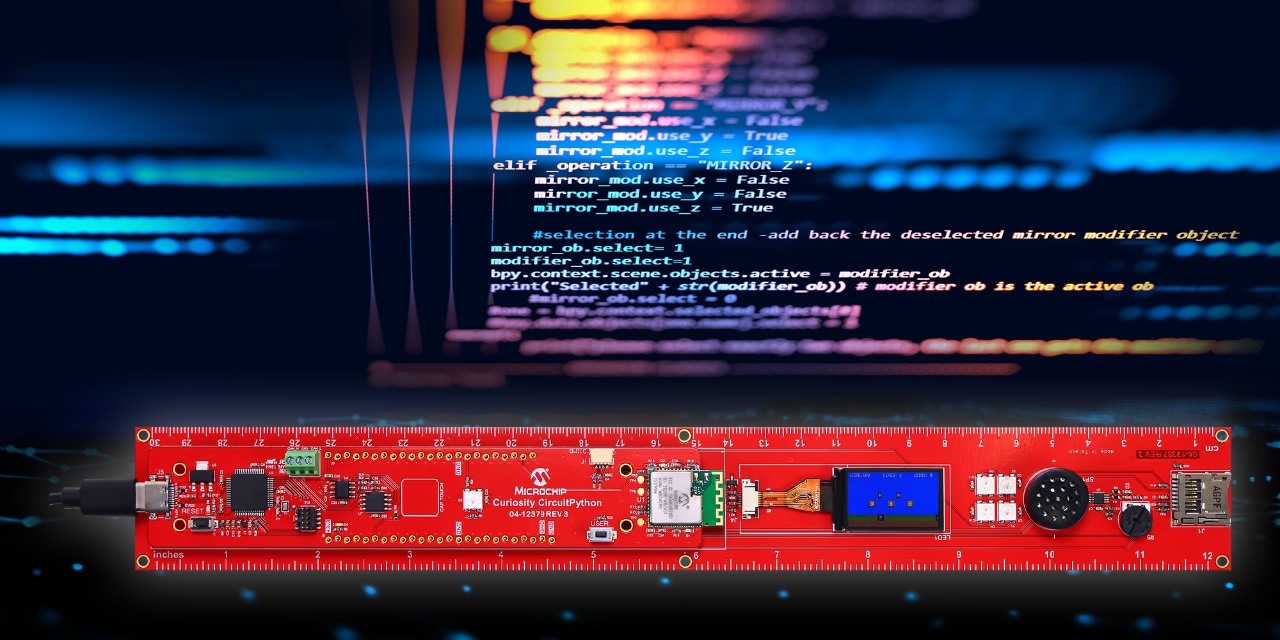
Designed for learning, built like real hardware. Meet the Microchip Curiosity PyKit Explorer—a CircuitPython development kit designed to stay on your desk, not in a drawer. Featuring a SAME51 MCU, TFT display, IMU, sensors, audio and BLE, it enables engineers and students to go from LED blink to full games, all while reinforcing real embedded design concepts.
There’s a persistent problem in embedded systems education: development kits disappear into drawers, never to be seen again. Students get excited, run through a blinking LED demo and then the hardware disappears along with their momentum.
The PyKit Explorer was designed to prevent that.
A Ruler, But Make It Engineering
At first glance, the Microchip Curiosity PyKit Explorer looks like something a teacher would confiscate for being off-topic. Designed in the form factor of a 12-inch ruler, it’s designed to earn a permanent spot on a student’s desk as a practical everyday object, not just a development board that gets packed away after class.
But don’t let its appearance as a ruler fool you. This is a seriously powerful embedded systems development platform.

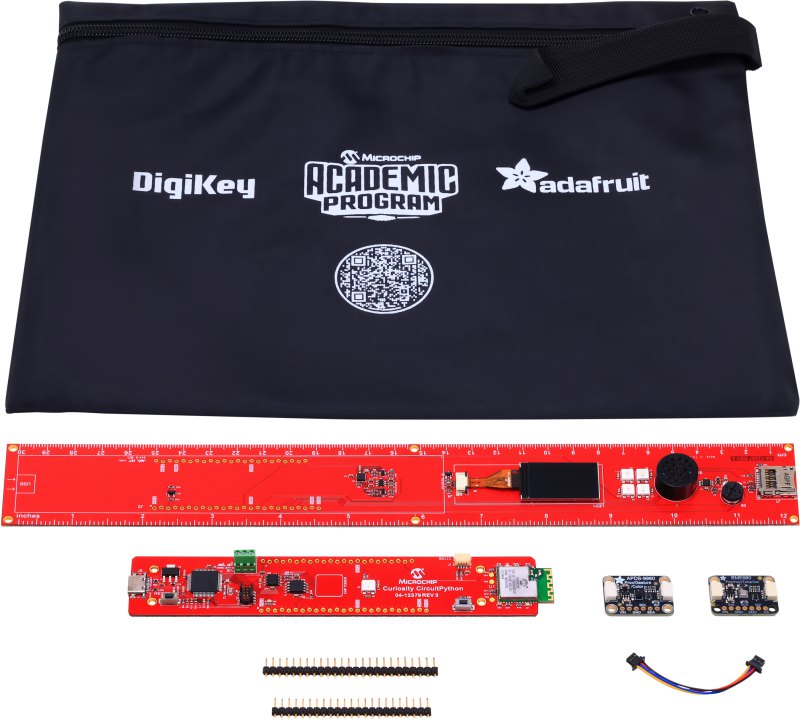
The kit pairs the 32-bit SAME51 Curiosity CircuitPython development board with the PyKit Ruler baseboard via a solderless friction-fit header connection. The hardware specifications are genuinely impressive:
- 4MB of Flash for storing user programs and libraries
- 9-DoF IMU for motion and magnetic field sensing
- CAN bus support
- 1.14” TFT color display
- Class-D audio amplifier and 8-ohm speaker
- Five NeoPixels
- MicroSD slot
- Wireless connectivity via the Microchip RNBD451 BLE module
- STEMMA/QWIIC connector for adding I²C breakout boards
Two plug-and-play sensor boards are included out of the box: a BME680 for environmental sensing (temperature, humidity, pressure, air quality) and an APDS-9960 for gesture, color and proximity detection. Because the platform uses the STEMMA/QWIIC connector standard, expanding it is as simple as daisy‑chaining additional STEMMA/QWIIC breakout boards and pulling from the wealth of existing libraries and code examples.
Each kit also comes with a USB cable, Microchip Academic Program stickers, a Microchip pen and a pouch to keep it all in!
 |
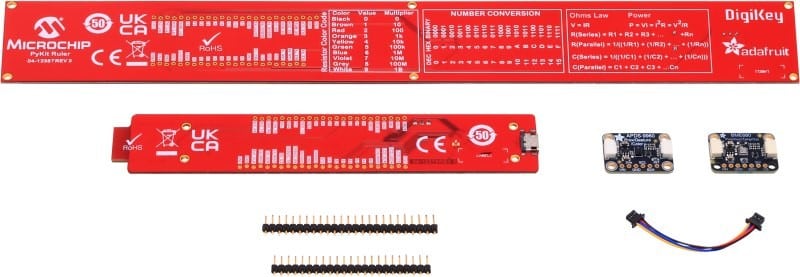
On the back of both the ruler and dev board is the full pinout. On the back of the ruler there’s even useful engineering information: the resistor color code; number conversions between decimal, binary and hexadecimal; and useful equations including Ohm’s Law, Power equations, along with series and parallel resistor and capacitor equations.
Why CircuitPython?
CircuitPython is a fork of MicroPython, a lean, efficient implementation of Python 3 optimized for microcontrollers. Since Python is now the de facto first language taught in high schools and universities, most students arriving at a workshop already speak the language. CircuitPython just puts that knowledge to work on real hardware.
The key insight is that this lowers the barrier to entry without limiting what’s possible. Students write real Python to control real hardware, with no toolchain setup, no compilation step and no mystery. Plug in the board, open the drive that appears on your computer, edit your code and it runs. For editing, students can use Adafruit’s Mu editor with its built-in serial console, VS Code with the Serial Monitor extension or just a text editor and a terminal. If nothing is installed at all, there’s always vscode.dev, a lightweight browser-based version of VS Code, albeit with some restrictions.
For embedded systems education, this changes the calculus entirely. Instead of spending the first hour of a workshop fighting a build environment, students are blinking LEDs within minutes and building IMU-controlled games by the end of the session.
From LED Blink to Super Mario Bros
The workshop program built around the PyKit Explorer follows a structured five-tier progression:
- GPIO fundamentals and cooperative multitasking: inputs and outputs, state machines, non-blocking scheduling, the foundations of embedded thinking
- IMU and display integration: reading motion data, rendering to move a sprite on the TFT screen
- Environmental dashboards: pulling sensor data from the BME680 and visualizing it in real time
- Audio and gesture projects: a digital Theremin, gesture-triggered WAV playback, measuring
- Full game implementations: Donkey Kong, Snake and Super Mario Bros, controlled by tilting the board
Every project is grounded in real embedded systems concepts: working with GPIO, PWM, communications protocols (UART, SPI, I²C), sensor fusion, hardware abstraction layers, state machines and event-driven design with multiple concurrent tasks.
A typical workshop runs 3–4 hours. Microchip Ambassadors can tailor the content to their audience, selecting the projects that best fit their attendees or run multiple sessions, for example, one per month, to guide students through the complete progression.
Delivered by Ambassadors, Nationwide
The workshop program runs through Microchip Ambassadors: employees across the country who are passionate about engaging with academia and the maker community. Ambassadors connect with local high schools, universities and makerspaces to bring workshops to their communities, allowing Microchip to reach students and educators at scale while keeping the sessions personal and hands-on.
The project library is also continuously expanding, so returning students always have something new to build.
Availability
The PyKit Explorer is moving into production soon. While not yet available, kits will be sold through DigiKey later this year, with additional distributors expected to follow.
If you’re an educator, makerspace organizer or student interested in bringing a workshop to your institution, this is a platform worth watching. Get in touch with Microchip’s Academic Program.
Ross Satchell, Senior Engineer in Microchip Technology's Academic Program, developed the PyKit Explorer as part of Microchip’s mission to make embedded systems education more engaging and accessible for the next generation of engineers.