Log in to myMicrochip to access tools and benefits. Sign up in just one minute.
Maximize Your Experience: Reap the Personalized Advantages by Completing Your Profile to Its Fullest. Update Here
Stay in the loop with the latest from Microchip. Update your profile while you are at it. Update Here
Complete your profile to access more resources. Update Here

Overview
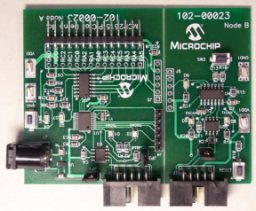
The MCP2515 PICtail™ Demo Board implements a simple CAN bus using two nodes. One node uses the MCP2515 Stand Alone CAN controller and the other node uses the MCP25020 CAN I/O Expander. Each node utilizes one input (push button) and one output (LED).
The boards demonstrate a simple, inexpensive implementation of a CAN bus. The MCP2515 node transmits its input (push button) information at regular intervals and request input (push button) information from the MCP25020 at regular intervals. An LED on each node reflects the state of the other node's push button.
The boards demonstrate a simple, inexpensive implementation of a CAN bus. The MCP2515 node transmits its input (push button) information at regular intervals and request input (push button) information from the MCP25020 at regular intervals. An LED on each node reflects the state of the other node's push button.
- Two (2) CAN nodes consisting of:
- Node A: MCP2515, PIC16F676 and a MCP2551 CAN transceiver
- Node B: MCP25020 CAN I/O Expander and MCP2551 CAN transceiver
- Each node also has one push button and one LED connected to the I/O
- The push button state from each node is sent to the other node via a CAN message
- Two headers on Node A, used for programming the PICmicro® Microcontroller Unit (MCU) using the programming features of the PICkit™ 1 Flash Starter Kit or PICkit™ 2 Microcontroller Programmer. Neither header is populated
The MCP2515 PICtail™ Demo Board implements a simple CAN bus using two nodes. One node uses the MCP2515 Stand Alone CAN controller and the other node uses the MCP25020 CAN I/O Expander. Each node utilizes one input (push button) and one output (LED).
The boards demonstrate a simple, inexpensive implementation of a CAN bus. The MCP2515 node transmits its input (push button) information at regular intervals and request input (push button) information from the MCP25020 at regular intervals. An LED on each node reflects the state of the other node's push button.
The boards demonstrate a simple, inexpensive implementation of a CAN bus. The MCP2515 node transmits its input (push button) information at regular intervals and request input (push button) information from the MCP25020 at regular intervals. An LED on each node reflects the state of the other node's push button.
Cannot load image!
Documentation
Filter by Document Type
Search Documentation
|
Title
|
Document Category
|
|||
|---|---|---|---|---|
| MCP2515 CAN Controller PICtail Demo Board Firmware | Software Libraries and Firmware | Download | ||
| MCP2515 CAN Controller PICtail Demo Board Gerbers | Board Design Files | Download | ||
| An introduction to the CAN protocol that discusses the basics and key features. | Application Notes | Link | Download | |
| Understanding Microchip?s CAN Module Bit Timing | Application Notes | Link | Download | |
| A CAN Physical Layer Discussion | Application Notes | Link | Download | |
| MCP2515 Stand-Alone CAN Controller PICtail Demo Board User's Guide | User Guide | Download | ||
| MCP2515 Stand-Alone CAN Controller with SPI Interface Data Sheet | Data Sheets | Download |