We detect you are using an unsupported browser. For the best experience, please visit the site using Chrome, Firefox, Safari, or Edge. X
Maximize Your Experience: Reap the Personalized Advantages by Completing Your Profile to Its Fullest. Update Here
Stay in the loop with the latest from Microchip. Update your profile while you are at it. Update Here
Complete your profile to access more resources. Update Here

Finding the HostID on a Windows® PC Using IPCONFIG

How to Use IPCONFIG to Find the HostID for Your Prochip License Request
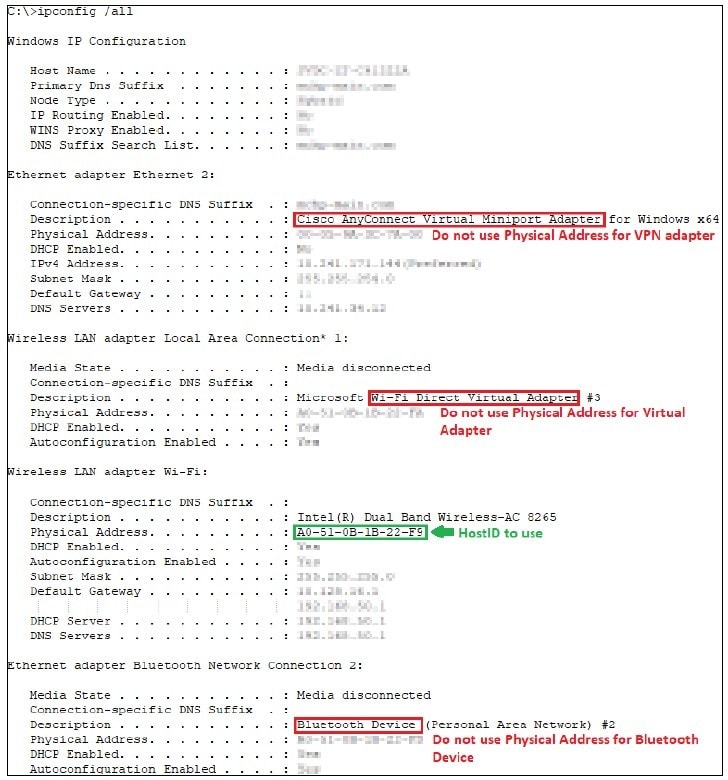

IPCONFIG is a command-line utility that can be used to display the network settings of a PC. When you launch IPCONFIG, you will see information about your network’s configuration, including the physical address of your Ethernet adapter, which is a 12-digit hexadecimal number which uses this format: XX-XX-XX-XX-XX-XX. This is the HostID number that you will need to provide to generate your Prochip license.

Open a DOS window (command prompt), and enter the following command to display all the network settings for your PC:

C:\> ipconfig /all

This will generate a list of settings that are similar to the one in this example:

Finding the FlexID


The FlexID number can be found on the label for the dongle (hardware security key). It begins “FLEXID=”, followed by a series of numbers in one of these formats: X-XXXXXXXX or XX-XXXXXXXX. You will need to provide this FlexID number to generate your Prochip license file.

Live Chat

Need Help?

Privacy Policy