Log in to myMicrochip to access tools and benefits. Sign up in just one minute.
Maximize Your Experience: Reap the Personalized Advantages by Completing Your Profile to Its Fullest. Update Here
Stay in the loop with the latest from Microchip. Update your profile while you are at it. Update Here
Complete your profile to access more resources. Update Here

Overview
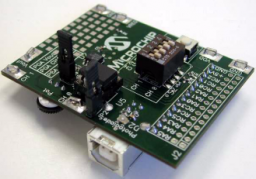
Use the MCP6S22 PGA PICtail™ Demo Board to evaluate and demonstrate Microchip Technology’s MCP6S21/2/6/8 Programmable and MCP6S91/2/3 Gain Amplifier (PGA) families.
Interface this board with Microchip’s PICkit™ 1 Flash Starter Kit to demonstrate firmware integration between the PIC MCU and PGA devices, while allowing you to modify and develop firmware for your specific requirements
The MCP6S22 PGA PICtail™ Demo Board can also be used in stand-alone mode, wherein the board uses a:
Interface this board with Microchip’s PICkit™ 1 Flash Starter Kit to demonstrate firmware integration between the PIC MCU and PGA devices, while allowing you to modify and develop firmware for your specific requirements
The MCP6S22 PGA PICtail™ Demo Board can also be used in stand-alone mode, wherein the board uses a:
- USB interface to communicate directly to a Personal Computer (PC)
- Graphical User Interface (GUI) to display the PGA output voltage
- Demonstrates MCP6S22/92 PGA functionality
- Interfaces to the PICKit™ 1 Flash Starter kit
- Interfaces directly to a PC via the USB port for stand-alone mode of operation
- 13-Bit Analog-to-Digital Converter (ADC) with SPI interface
- An optical sensor circuit connects to the PGA
- An adjustable voltage source connects to the PGA
- Four-layer PCB with separate ground and power supply planes provide noise immunity
- Four-layer PCB with separate ground and power supply planes provide noise immunity
Use the MCP6S22 PGA PICtail™ Demo Board to evaluate and demonstrate Microchip Technology’s MCP6S21/2/6/8 Programmable and MCP6S91/2/3 Gain Amplifier (PGA) families.
Interface this board with Microchip’s PICkit™ 1 Flash Starter Kit to demonstrate firmware integration between the PIC MCU and PGA devices, while allowing you to modify and develop firmware for your specific requirements
The MCP6S22 PGA PICtail™ Demo Board can also be used in stand-alone mode, wherein the board uses a:
Interface this board with Microchip’s PICkit™ 1 Flash Starter Kit to demonstrate firmware integration between the PIC MCU and PGA devices, while allowing you to modify and develop firmware for your specific requirements
The MCP6S22 PGA PICtail™ Demo Board can also be used in stand-alone mode, wherein the board uses a:
- USB interface to communicate directly to a Personal Computer (PC)
- Graphical User Interface (GUI) to display the PGA output voltage
Cannot load image!
Documentation
Filter by Document Type
Search Documentation
|
Title
|
Document Category
|
|||
|---|---|---|---|---|
| MCP6S21/2/6/8 Datasheet | Data Sheets | Download | ||
| MCP6S22 PGA PICtail Demo Board Firmware | Software Libraries and Firmware | Download | ||
| MCP6S22 PGA PICtail Demo Board Gerbers | Board Design Files | Download | ||
| Interfacing MCP6S2X PGAs to PICmicro® Microcontroller | Application Notes | Link | Download | |
| Single-Ended, Rail-to-Rail I/O, Low-Gain PGA | Data Sheets | Download | ||
| MCP6S22 PGA PICtail Demo Board User's Guide | User Guide | Download |