
Design Flexibility With the Zephyr Project
From hardware changes to next-generation product updates, the Zephyr Project helps design engineers stay agile. Explore how Zephyr simplifies cross-platform development and reduces the effort required to move between MCUs and development boards.
One of the biggest benefits of the Zephyr Project is the ability to migrate from one microcontroller (MCU) to another with minimal effort. This process is basically the same whether the design is moving between Microchip’s devices or a competitor’s latest and greatest.
The reason why Zephyr makes it so simple to migrate is due to the consistent way APIs are written across devices. In a normal vendor specific toolchain, APIs tend to be very device-specific. This can give developers the most functionality from the product they are using but comes with the downside that migrating from one part to another, even within the same vendor’s ecosystem, can be tricky. By contrast, Zephyr standardizes API calls so that every device has the same. The result is that no user-written code needs to be modified to migrate across devices or vendors, assuming all of the features are supported on both devices and nothing non-standard is in use.
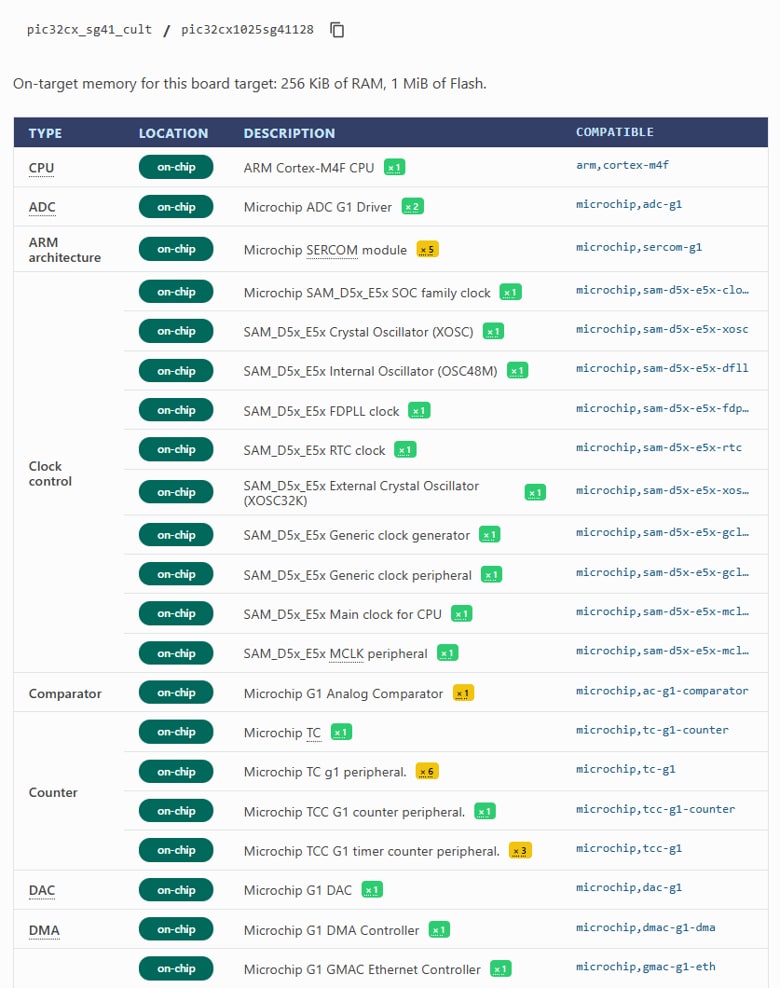
To migrate a project in Zephyr, first identify what peripherals and libraries are being used, and compare that to the desired device’s supported list. The simplest way to do this is to pull up the development board page and scroll to the compatible table. A screenshot of this table from the PIC32CX SG41 Curiosity Ultra page is shown below.
 |
Once the peripherals/libraries in use are verified to exist on the target, then the actual work of switching can begin. Zephyr uses two systems behind the scenes to ensure the right files and code are used to compile the program: KConfig and Devicetree. KConfig describes software features with macros while Devicetree describes hardware configurations. Both tools use a hierarchical description, from high level to low level, at compile time. In other words, they use the following hierarchy: Project ← Board ← Device Family ← etc...
To change to a new board, first run the west build command with a new board target (ex: west build -b <board name>). This build may fail, but it will start the process of switching. Additionally, if the project references any .overlay files (project level Devicetree), review the file(s) and remap any definitions as needed. Then, KConfig can be accessed and reconfigured by using west build -t menuconfig, if needed. If everything has gone smoothly, then the program should compile for the new target and is ready for programming using the appropriate west flash command.
This is one of the benefits of using Zephyr for large scale applications. If an MCU becomes unavailable or underpowered, then with Zephyr it’s easy to change to a new device to support the evolving needs of the application.
Want More?
For more information, visit the Zephyr Project’s website.